

Welcome to the 12 new FullStack HR readers who joined last week!
The ambition is high with this newsletter - to be the guide for organisations in this AI transformation that is happening!
If you aren’t yet subscribed, join the other like-minded people in this free newsletter by subscribing below:
Happy Saturday,
I started writing a skills guide, but then I figured, let’s start with a full breakdown of Cowork / Codex instead. So here we go. A complete, free walkthrough of how to set up Cowork (or Codex, or Copilot Cowork). Because AI is moving from “chat with a model” to “build reusable workflows that do real work with you.”
For us in HR, that means policy drafts, job postings, onboarding, employee comms, reporting, and all the repetitive work that eats up your week.
I will also say that I’m running beta cohort 2 of Cowork for HR, starting on the 4th of June.
Three live sessions where we build real HR workflows together.
30% discount if you sign up before the 15th of May.
$553 instead of $790.
Join the interest list here.
That said, let’s get to it.
As most of you know, I’ve spent the past year helping CHROs and their teams get AI to work inside the HR function, not in pilots but in daily operations, in reports and performance cycles, in comp reviews and 1-on-1s. This guide is the consolidated version of what I keep saying in those conversations, written so you, as CHRO, can sit down on a Sunday afternoon and have a working setup by Monday morning.
(Ok, it works in the same way if you are an HRBP, HR Generalist, Recruiter or just a manager…)
The tool in focus is Claude Cowork, Anthropic’s desktop app, but the principles overlap with OpenAI’s Codex and with Copilot Cowork (the version Microsoft just rolled out to its Frontier program).
I say that but it’s also important to note that these three products share a family resemblance, but they are not interchangeable. Claude Cowork is a desktop knowledge-work agent. Codex used to be a coding agent primarily, but is now way more “cowork-like”, but still in my opinion not as user-friendly as Cowork. (It’s getting better day by day, though.)
Copilot Cowork is a Frontier preview that lives inside the Microsoft 365 stack with its own admin and security framing.
The principles in this guide overlap across all three, but the setup steps and the risk model differ. When you read “Cowork” below, mentally substitute the equivalent component in your tool of choice.
Let’s dive in.
What Cowork is
Cowork is a desktop agent rather than a chat or a website, meaning it’s a program you install on your own computer that has access to your files, can drive your browser, read your calendar, and run reusable workflows (called skills) on a schedule. It is not ChatGPT in a new outfit, and the difference becomes obvious once you start using it. Instead of operating in a separate tab where you copy and paste between systems, Cowork operates as you do on your computer, updating an Excel file in Dropbox without you re-uploading it, logging into Workday on your behalf, or following up on a candidate pipeline by reading email, cross-referencing Slack, and updating Teamtailor in one continuous flow.
For better and worse, more on the worse part in a minute.
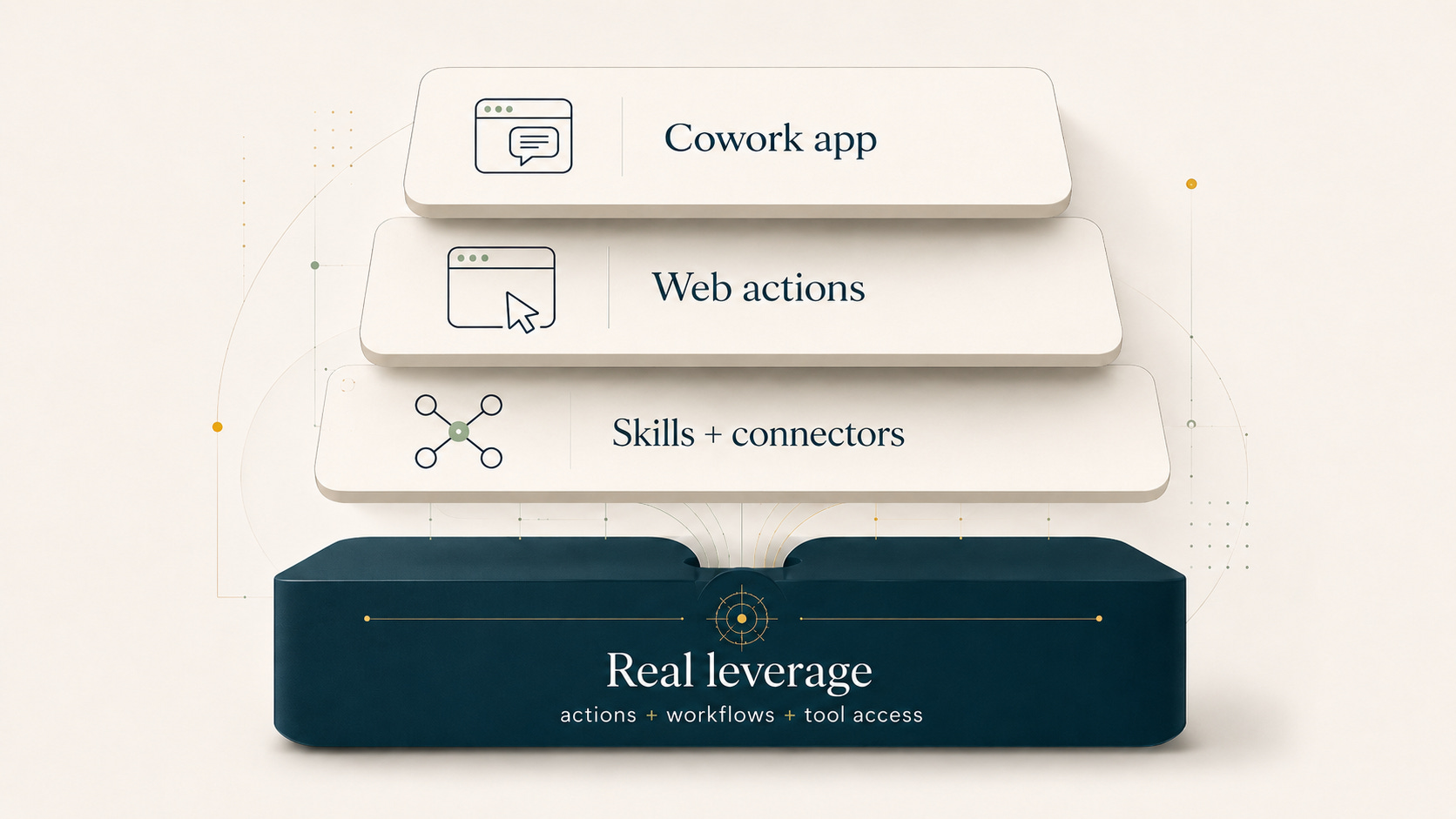
Cowork is made of three parts
It’s worth understanding the architecture before you set anything up, because most CHROs only install the first piece and then wonder why the leverage feels modest.
The Cowork app. This is the desktop app itself, where you chat and run skills. On Mac it’s a three-minute install, while on Windows it can be tricky because it runs inside a virtual machine, so plan to involve IT if you’re on a corporate Windows laptop.
Claude for Chrome. This is the browser extension that most CHROs miss, and without it Cowork can’t act on the web on your behalf, which removes about half of the value. The extension runs in Chromium-based browsers, including Google Chrome, Comet, and Atlas; it does not run in Safari, Edge, or Firefox.
This is the piece that lets Cowork open LinkedIn, scroll your inbox, fill out forms, or log into your HRIS as you. Many browser workflows can be delegated this way, but not all sites or actions work reliably, and Anthropic blocks certain high-risk categories outright. Treat the extension as a powerful generalist that still has limits, not as a universal “anything you can do on the web” button.
Skills and connectors. This is where the leverage lives. Skills are reusable workflows that you build once and call thousands of times, while connectors are how Cowork talks to your existing tools (Gmail, Calendar, Slack, your HRIS, your ATS). Without skills and connectors, Cowork is roughly a chat with a slightly better user interface; with them, it starts to feel like a colleague who already knows how your function works.
Skills before prompts
Most CHROs I talk to use AI by opening a chat, throwing in a question, copying the answer, closing the tab, and starting from zero the next day, which is not AI usage so much as an expensive Google search. The shift that creates leverage is moving from one-off prompts to reusable skills, where each skill is a saved instruction set that says when I ask about X, always do Y in format Z, always pull context from file A, and ask me about B if I forgot to mention it.
You build it once, and you call it in three seconds, which means the second run is already cheaper than the first, and by the twentieth run, you’re operating at a different speed than your peers.
How you build a skill is straightforward, and you don’t need to write any code.
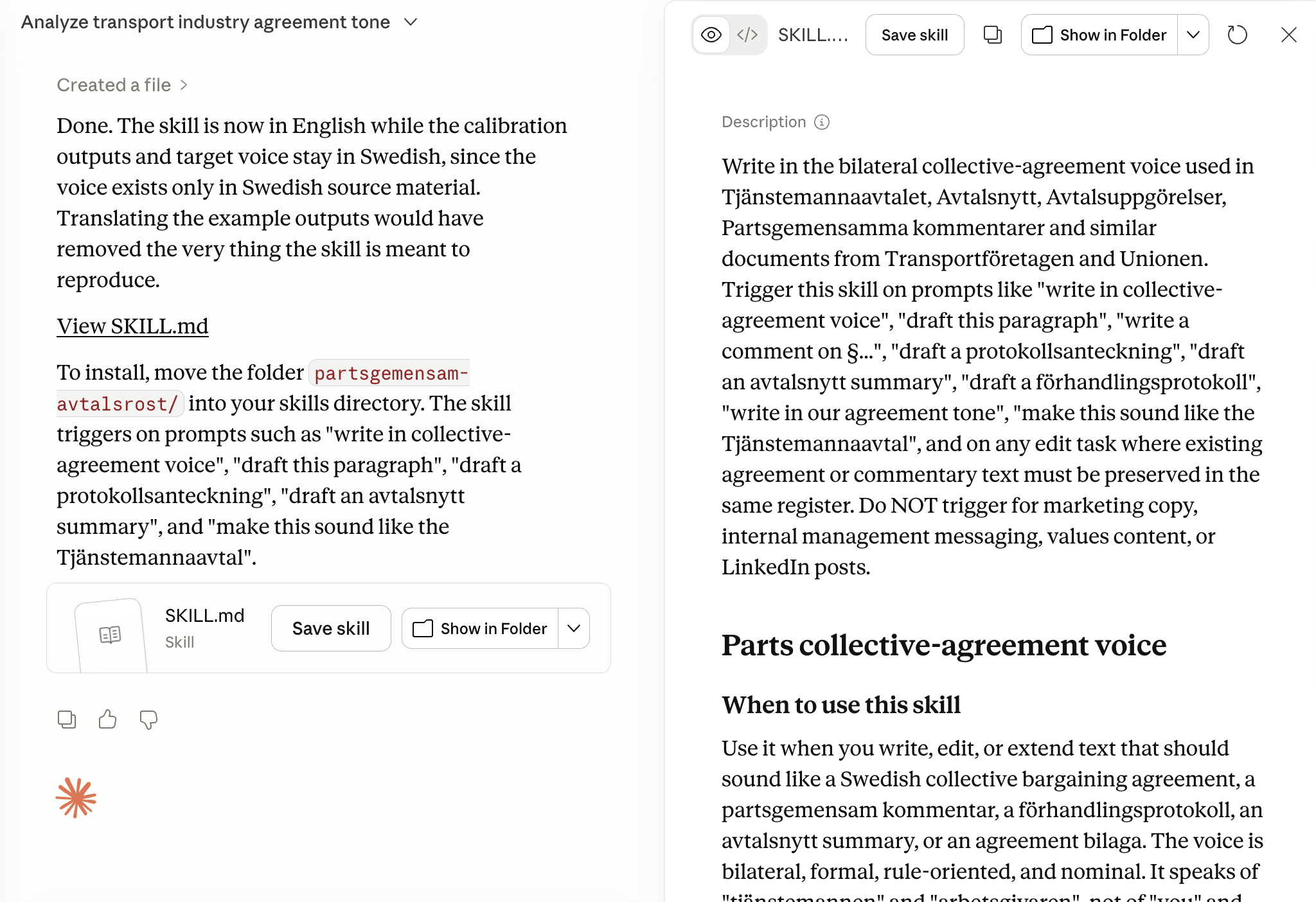
Solve the problem manually in Cowork once until you’re satisfied with the output, then say “use skill creator to make a skill out of this” and let Cowork ask you a few clarifying questions about what it should ask next time, whether it should verify output, and where it should pull context from. Once those questions are answered, you have a skill, saved and ready to call.
The difference between writing a fresh prompt every time and calling a skill is roughly the difference between manual math and an Excel macro, and twenty runs into a performance cycle the difference compounds into hours saved every week.
Connectors and MCP
CHROs deploying Cowork end up talking to IT sooner or later, so it helps to have the vocabulary ready before that meeting starts. And the main reason for that is connectors.
A connector is how Cowork talks to an external system, and Cowork / Codex ships with a library of pre-built connectors for the obvious tools (Gmail, Calendar, Slack, Asana, Notion, Drive, OneDrive); you click the plus button, pick a connector, authenticate, and you’re done.
MCP stands for Model Context Protocol, a standard Anthropic created so that LLMs can talk to external systems without bespoke integration work, and when a vendor says “we have an MCP server for X”, what they mean is that Cowork (or ChatGPT, or Copilot Cowork) can connect to X with a few clicks rather than a six-month integration project.
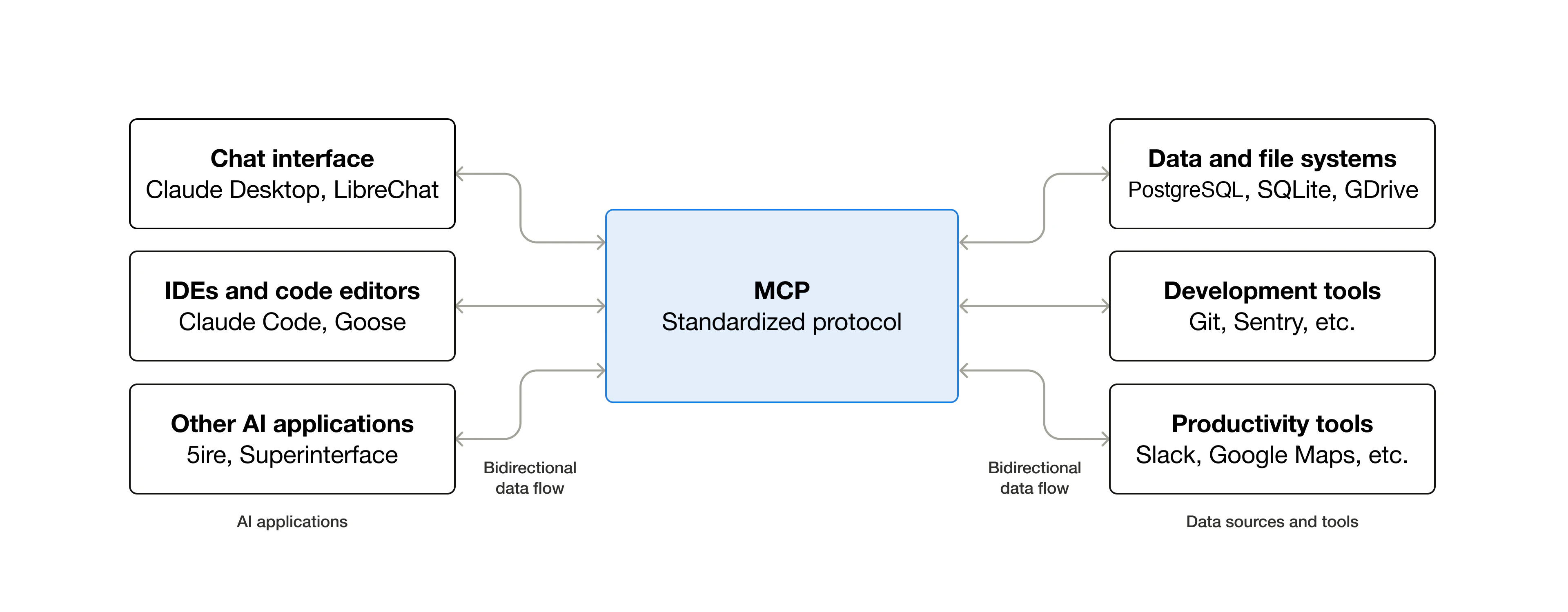
The difference between an MCP and a traditional API is worth understanding before that conversation starts. An API is narrow and prescriptive, where each call asks a very specific question (give me field A for employee 12345). An MCP gives the agent a structured way to discover and use the tools and resources that the server chooses to expose, which makes it more flexible and more powerful in skilled hands. It does not automatically grant total access. The actual surface area depends on the server’s implementation, the scopes you authorize, the auth model, and where the server is hosted. That power is exactly why governance, ownership, and hosting decisions matter more for MCP than for a single API call, and why your IT team will have questions when you start mentioning it.
Many HR tools will have an MCP or get one in 2026, so the practical advice is to ask your vendors directly whether they have an MCP server on their roadmap.
If the tool you need doesn’t have one, you have two paths forward. The first is to use Claude for Chrome and let Cowork act in the browser as you, which works surprisingly well, while the second is to build your own MCP server from the vendor’s API documentation, which is more advanced but doable, and cheap to host on something like Railway or run locally on your machine.
Setup
Before you dive into doing stuff with Cowork, set the foundation properly, because the leverage you get from each workflow is roughly proportional to the amount of context Cowork has about your company and you. Don’t skip this part, it’s worth spending time on this!
The first thing to build is a memory file with company and role context, placed in your workspace and describing the basics of your organization, including company name, employee count, geographies and industry, the org structure at a high level, which HRIS, ATS, comp tools, learning systems, and engagement platforms you use, the timing of your performance cycles, your career levels and naming conventions, the language choices you’ve made internally (”we say colleagues, not employees”), and the labor jurisdiction(s) you operate under.
This single file is the difference between an assistant who sounds like a consulting deck and one who already works at your company.
I’ve created a free CLAUDE-md-template-for-CHROs.md - click the link and you’ll get it for free.
Drop that into Cowork and explain to Cowork that you want it to help you set it up and it will facilitate the whole process!
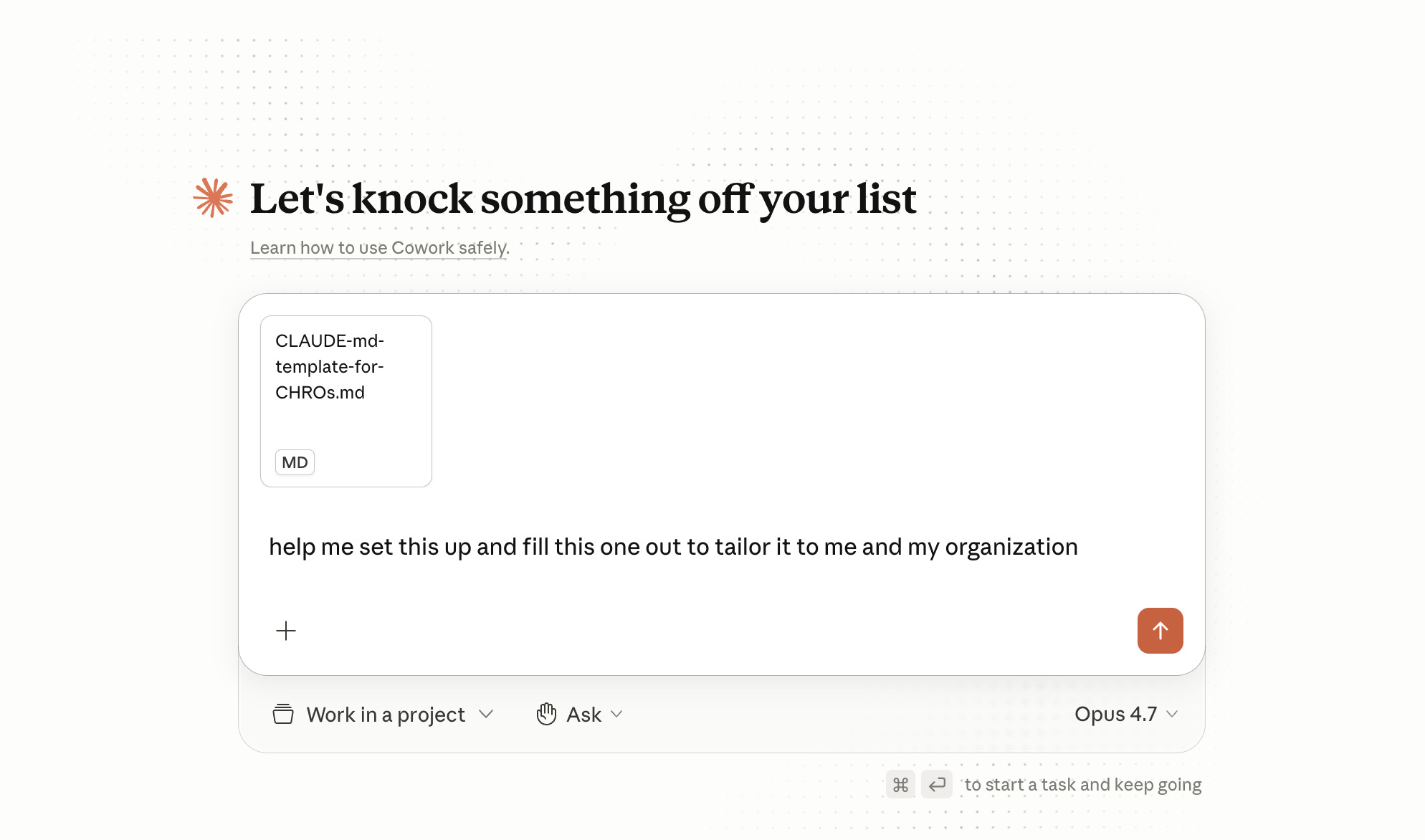
The second thing to set up is a baseline of three sources connected, starting with your calendar so the system understands meetings and rhythm, then a file storage system such as Drive, SharePoint, or Box where policies, frameworks, and templates live, and finally your meeting transcripts in Krisp, Fireflies, or Otter. With those three connected, Cowork can answer questions like “what did I promise the manager group in June?” without you searching anything manually.
If you don’t use a transcription service, then skip that step (doh).
The third thing is a brand voice skill, which sounds fancy but is straightforward in practice. You upload five finished internal texts, such as a performance template, a CEO communication, a policy doc, a job description, and a values guide, you have the model extract tone rules, and you save the result as a skill that gets called by every future text you produce. (Need a prompt for it? Steal it here.)
That’s it. Plan for one to three hours, and the leverage starts. But do it properly - the above steps, that’s what makes the tool magic!
Scheduling
Up to this point we’ve talked about skills you call manually, and the next step is letting Cowork run them on a schedule, which is where the experience starts to feel less like a tool and more like a colleague. You say “schedule this to run every Monday morning at 7:30 and deliver the result to me in Slack” and Cowork sets up the recurring job, including delivery channel and timing.
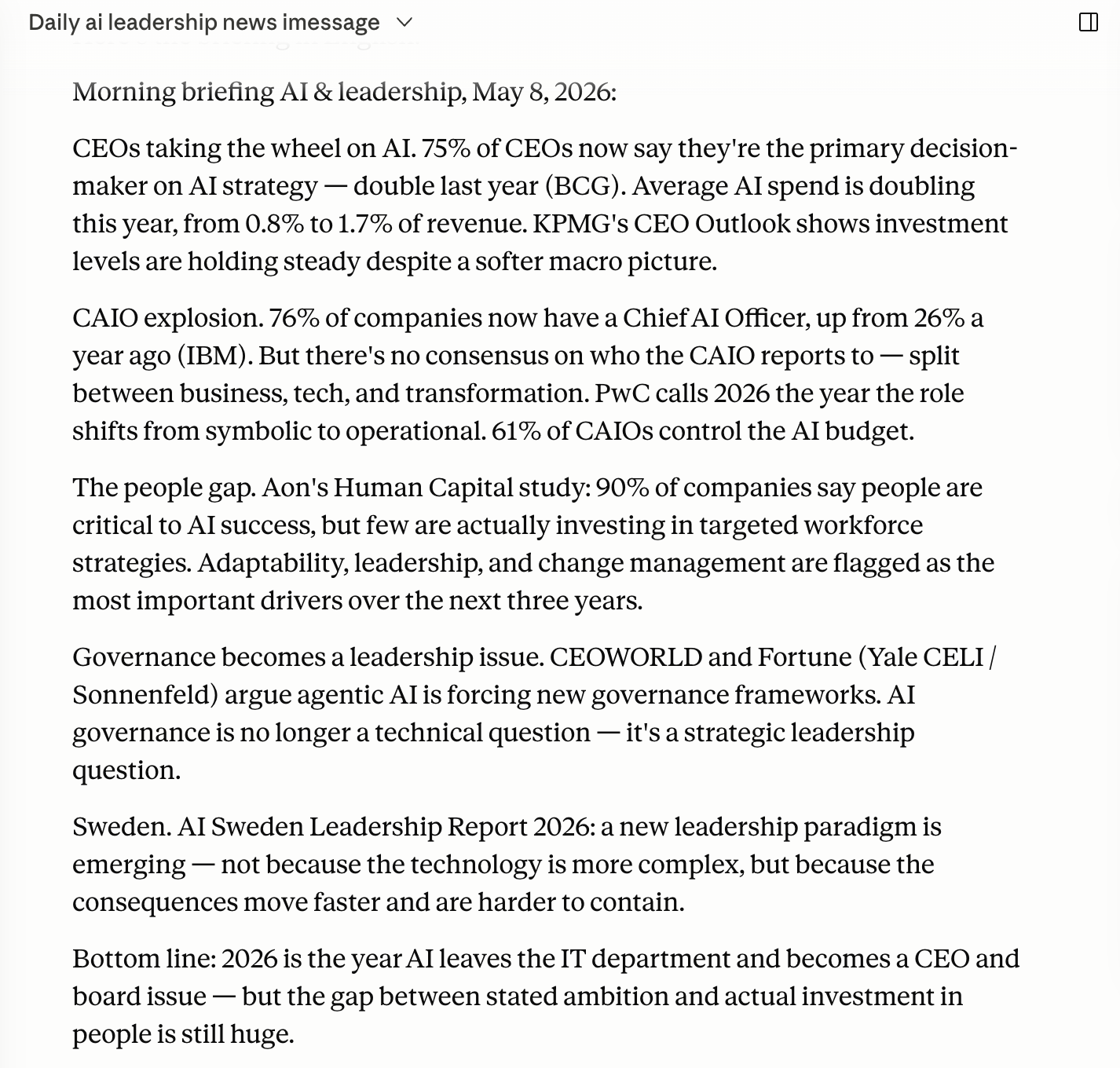
My personal setup right now runs through the week. Every morning a summary of new AI and leadership news from the past day lands in my inbox, every Tuesday morning a weekly report on the general labor market arrives, every Friday at 4pm a week recap shows up with what I’ve promised whom and what’s still open, and once a month my bookkeeping tool compiles a P&L for me, run locally with no cloud traffic, which keeps the financial data on my machine
.
There are two practical things to know about scheduling. The computer must be on, because Cowork runs locally, which means your laptop has to be powered on and online when the schedule fires; if you put a schedule at 6am but you’re not a morning person, your Monday job will silently miss its window, so put it at 9am instead. There is a Keep Awake mode for the rare cases when you need it, but it kills battery and should be used consciously rather than as a default.
The second practical thing is that skills save you tokens, because scheduled tasks without an underlying skill consume more tokens than necessary as the model has to think from scratch every time the schedule fires. Build the skill first, then schedule the call to it, and you’ll keep your monthly token budget intact.
Skills governance
When I work with larger organizations on Cowork, one challenge surfaces after a month or two. Everyone is building their own skills, nobody knows which ones exist, half the org is running a suboptimal version of the same skill, and nobody owns maintenance. This is a real problem that isn’t technical so much as a problem of ownership and process, and it gets worse the more useful the tool becomes.
My recommendation, based on how I’ve seen it work in practice is this;
Every meaningful skill should be versioned in a central skills repo in GitHub, with submitting an update done as a pull request rather than as a Slack message to whoever feels responsible that week.
You need one or two named gatekeepers who approve pull requests, check that the skill works, that it doesn’t conflict with existing ones, and that it follows your naming convention.
Every skill must have a named owner responsible for keeping it current, because skills rot when nobody owns them.
When a skill is updated, the system should ping Slack or Teams so the team knows to pull the new version; otherwise, people end up running stale variants without realizing it.
Is this overkill for a thirty-person HR function? Yes, and a shared Drive folder with a clear naming convention will do the job there. Is it overkill for a two-thousand-person organization where five managers have already built their own performance review skills with subtly different definitions of “Exceeds”? No, skipping the governance step there saves you nothing in the short run while costing you a six-month mess later.
Security
As said, CHROs deploying this end up in conversations with IT. But most likely you’ll also end up talking to legal and infosec, so it helps to walk in with the answers ready rather than having those conversations slow you down.
Cowork runs on your machine. Your files are stored locally, and any code or commands Claude executes run inside an isolated virtual machine separate from your main operating system. The nuance worth being precise about with IT is that file storage stays local, but the content of files Claude reads is sent to the model’s API for processing, same as any other Claude conversation. The local part is the storage, the execution sandbox, and the connection points to your apps. The inference happens in the cloud.
Cowork asks for explicit permission before deleting files, and computer use asks for permission per application before Claude can interact with it. The place people shoot themselves in the foot is by clicking “Always allow” too aggressively, or by switching on “Act without asking” mode. Anthropic’s own guidance is that this mode “significantly increases the risk of prompt injection attacks,” so it should only be used for well-defined tasks under active supervision.
If you’ve over-granted, permissions can be reviewed and reset in Claude Desktop’s settings (worth verifying the exact path in your version of the app before promising IT a specific click-path).
MCP servers are worth flagging to IT explicitly. A local MCP server runs on your computer with the same permissions as any other program you install. That’s efficient, but it means the trust model collapses to “do you trust the vendor of this MCP.” For sensitive systems like a bookkeeping tool, the recommended pattern is to host the MCP server locally rather than on a public host, so the data path stays inside your environment.
On prompt injection, which is the risk IT will absolutely ask about, Anthropic addresses it on three fronts. Content classifiers scan untrusted material entering Claude’s context, the Chrome extension strips hidden content before the agent sees it, and the model is trained via reinforcement learning to recognize and refuse malicious instructions even when they appear authoritative. The risk is non-zero, not zero, and you should still monitor for unexpected patterns.
When Cowork updates your systems (should you let it), you remain legally accountable for that update, same as if you’d delegated the task to an assistant. Anthropic’s documentation is explicit on this. The user is responsible for all actions taken by Claude on their behalf, including content published, messages sent, transactions, and actions by scheduled tasks.
In the EU? GDPR is where you need to be careful. Anthropic itself currently advises against using Cowork for regulated workloads, because Cowork activity is not captured in audit logs, the Compliance API, or data exports. The framing I use with CHROs is that this is a question that requires a case-by-case assessment together with your data protection officer, not a blanket yes or no, and you have to be honest with them about Anthropic’s own audit-log limitation up front. To put it more directly, do not use Cowork for personal data, employment-law decisions, or sensitive HR processes before your DPO and legal function have approved the specific use case. Approval for a recruiting summary is not approval for a termination workflow. Treat each new use case as its own conversation.
My summary is straightforward. Security around Cowork is a question that can be answered, not a question that can’t, and the difference between the two outcomes is whether your IT, legal, and DPO functions are involved early or whether they discover the rollout after the fact.
But all this said about security. Do not let this stop you from trying this out!
It’s 100% worth spending 20 bucks of your own money on your own computer just trying Cowork out.
As I alluded to in the beginning and in my post earlier this week, this is clearly where all model builders are heading right now.
Questions? Email me at johannes@sundlo.com. I’m not always fast but I respond.
Need help rolling this out in your organization? That’s the kind of work I do more or less every week, where we run workshops for not only CHROs but also lead teams and whole organizations. Not demos but real rollouts where adoption is the success metric. Email if you want to talk!
Otherwise, good luck!
This guide is free and meant to be shared, copied, adapted, and torn apart. If you build on it with your own skills, send them back!